
BLIK deferred payment
BLIK Pay Later in your shop.
The customer selects BLIK Pay Later, enters a BLIK code and confirms the purchase in their banking app. They have 30 days to repay under the financing provider's terms, while you receive the payment result in dpay.
- 30 days to repay
- Limit up to PLN 4,000
- PKO BP · VeloBank · Millennium · SGB

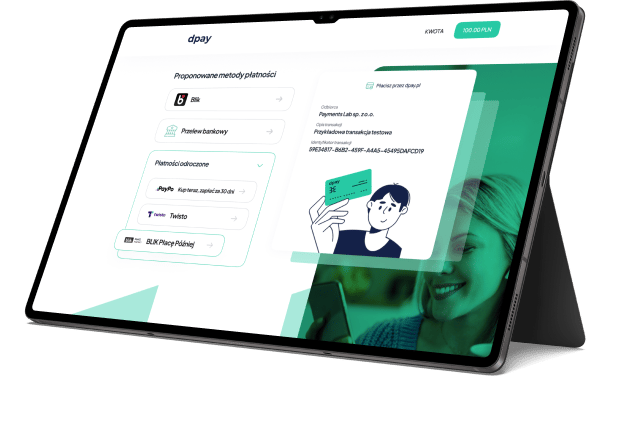
On the dpay payment page
The customer selects the method and returns to your shop after confirmation.
BLIK with deferred payment
Another option for customers who want to pay later.
The method appears alongside other payment options. Availability, the limit and terms depend on the customer's bank and the financing provider's decision.
The same BLIK code
The customer selects BLIK Pay Later, enters a code from their banking app and confirms the purchase.
A limit up to PLN 4,000
During activation, the customer may receive a shopping limit. Its amount is assessed individually by the financing provider.
30 days to repay
After the purchase, the customer manages the obligation and repayment in their banking app, while the shop receives the payment result.
Service availability
BLIK Pay Later in PKO BP, VeloBank, Millennium and SGB.
The method is currently available to customers using BLIK in the apps of PKO Bank Polski, VeloBank, Bank Millennium or SGB banks.
Service availability and the limit amount are assessed individually during activation. The list of supported banks may change.

VeloBank

Bank Millennium

SGB Cooperative Banking Group
Payment journey
Three simple steps for the customer.

Step 01
Select BLIK Pay Later
The customer selects the method on the payment page and enters a BLIK code from their banking app.

Step 02
Activate or confirm the service
On first use, the customer sees their available limit and terms, then confirms the purchase in the banking app.

Step 03
Return to the shop
dpay sends the payment result so the shop can continue processing the order.
One journey, clear roles
The customer chooses how to pay. You manage the sale.
Customer side
- Use a BLIK code from their banking app.
- See the available limit and terms during activation.
- Manage repayment in their bank's app after the purchase.
Your business side
- Offer the method alongside other dpay payments.
- Receive the result through your standard payment flow.
- The financing provider assesses the customer and presents the terms.
dpay pricing
See current BLIK Pay Later terms.
Current fees and terms are always available in the dpay price list.
More ways to pay
Add the methods your customers are looking for


BLIK Pay Later enquiries
Add BLIK Pay Later to your store.
Share your store URL and tell us how you accept payments today. Our reply will state method availability for your account and list the activation steps.
- The familiar BLIK flow
- Terms shown by the customer’s bank
- Payment result handled by dpay
Get started with dpay
Start accepting payments in your business
Create an account and complete verification. If you need help, our team is ready to answer your questions.
Start accepting paymentsOne integration
Popular payment methods



Ready to launch