Apple Pay. Pay with one gesture.
Customers on Apple devices pay with a saved card without typing its details.
- No card details to enter
- Face ID or Touch ID
- Included with card payments


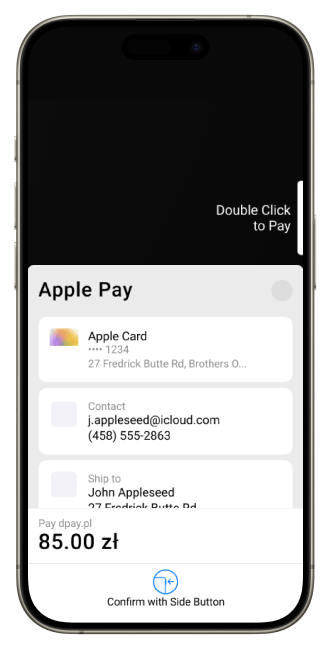
A shorter path from basket to payment
The customer chooses a card saved on their Apple device and confirms the purchase without re-entering card details.
Fewer steps
Customers pay on an iPhone, iPad or Mac with a card saved in Apple Pay.

No card details to re-enter
The customer uses card details saved in Apple Pay instead of typing the card number on the payment page.

Included with card payments
Check the current dpay price list for availability and fees.

Payment process
How does a customer pay with Apple Pay?

Step 01
Select Apple Pay
The customer selects Apple Pay on the dpay payment page.

Step 02
Choose a card
They select one of the cards saved on their Apple device.

Step 03
Confirm the purchase
They confirm with Face ID, Touch ID or the device passcode and return to your shop.
FAQ
Frequently asked questions
What does a customer need to pay with Apple Pay?
Does the customer enter their card number on the payment page?
How is Apple Pay provided by dpay?
Does the shop need to integrate directly with Apple?
How much does accepting Apple Pay cost?
dpay pricing
How much does Apple Pay cost?
Apple Pay is provided as part of card payments. Current card rates are listed in the dpay price list.
More ways to pay
Add the methods your customers are looking for
Payment cards
Accept secure Visa and Mastercard payments from customers in Poland and abroad.
Learn more
Google Pay
Pay with a card saved to a Google Account without entering its details again.
Learn more
BLIK
The customer enters a code from their banking app and confirms the payment on their phone.
Learn moreOffer Apple Pay to your customers.
Share your store URL and tell us how you accept card payments today. Our reply will state Apple Pay availability for your account and list the activation steps.
- No need to type card details
- Confirmation with Face ID or Touch ID
- Available as part of card payments
Get started with dpay
Start accepting payments in your business
Create an account and complete verification. If you need help, our team is ready to answer your questions.
Start accepting paymentsOne integration
Popular payment methods


